








- Operating Environments
-
・Requires Jedit X (Rev.2.20 later), Jedit X Standard or Jedit X Plus.
・Requires Mac OS X 10.5 or later.
・Universal Binary compatible.
・64-bit compatible preference pane.
・Max OS X 10.7 compatible.
- Just tap the option key twice...
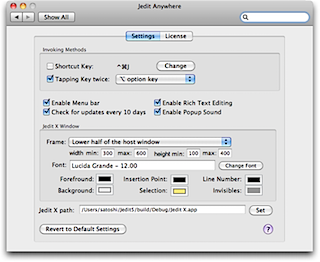
- Select the text you want to edit with Jedit X and just tap the option key(*1) twice. Then Jedit X window will popup and you can edit the text with Jedit X. After finishing editing, tap the option key twice again, then the result will be written back to the selected area in the target application.
- *1: You can assign option, shift, control, command or function key for the double tapping. Also you can assign cmd+character key for the single tapping shortcut.
- Supports rich text editing
- If the text in the target application was rich text, JeditAnywhere will open Jedit X window in rich text mode. You can also constrain JeditAnywhere to open Jedit X window only in plain text mode.
- Customizable Jedit X window properties
- In order to make the JeditAnywhere windows distinguishable from other normal Jedit X windows, you can specify the window position/size, background color, character color, character size and font of the document.
- Supports the menu item "Open Recent"
- From the menu item "Open Recent" at the menu bar, you can refer and reuse the contents that you edited before with JeditAnywhere.